The dangers of default credentials
7th February 2021
Passwords are a fact of life, whether they take the form of a simple PIN, a word or a randomly generated string of letters and numbers. The IT industry understands the need to protect devices so sets a username and password as the device leaves the factory - default credentials. Leaving this unchanged can be a major problem though.
Surely the password is unique to me?
There's been movement over time to equipment coming with what looks like a random string of letters and numbers,
something like ed3CWFfd83w, and that's a significant improvement over the standard "admin admin" username and password
combination. Nonetheless, there's no guarantee that the random string printed on your equipment is unique to you, nor
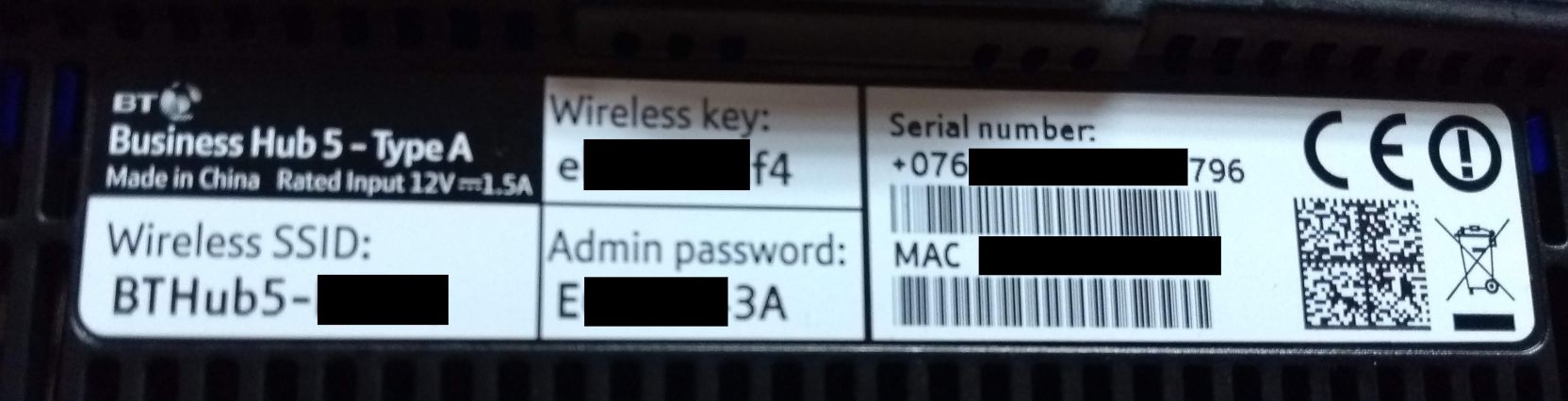
that it can't be generated with information available elsewhere. For example, an ISP in England issues their routers
with a wireless network configured with names like BTHUB5-HC23. There could be a link between the WiFi password and
the
name. Similarly it's possible the equipment's MAC address could be linked to the password generation routine - it's
not clear.
The tale of the printer
As part of a former job I had to keep an eye on the devices on the network, and I came across a printer that could be managed via a web page. This is fairly common in modern networked printers.
Without logging in to the printer at I was able to see consumable usage (toner etc.), but it was the password protected area that I was particularly interested in. After logging in I found there was a full address book, used for scan to email, plus scanned or printed documents seemed to be stored for repeat usage. This posed two issues. Firstly, I could change entries in the address book so that any documents got emailed to me instead, and secondly I could download previous documents. As a proof of concept I downloaded a few and came across payslips and invoices amongst other confidential documents.
For an attacker this printer would have been a potential gold mine of information. The ability to have new documents arrive at the attacker's own email address would have allowed for a level of persistence (continued access) - there's bound to be an interesting document turn up at some point! A forward-thinking attacker would set a rule on their own mailbox (or a setup a distribution group) so the employee still got the scanned image and was none the wiser.
- Solution: change the password.
- Best solution: change the password and disable the functionality if possible.
The tale of the UPS
An organisation that I worked with had a new UPS (Uninterruptable Power Supply), that came with a network management card put, into their data centre. Sounds grand - the UPS can send alerts in the event of a problem. My requirement was that the management card had to be subjected to a vulnerability scan and this turned up two things, but importantly that there was a default password and after logging in to confirm the finding I was met with this:
%%SCREENSHOT
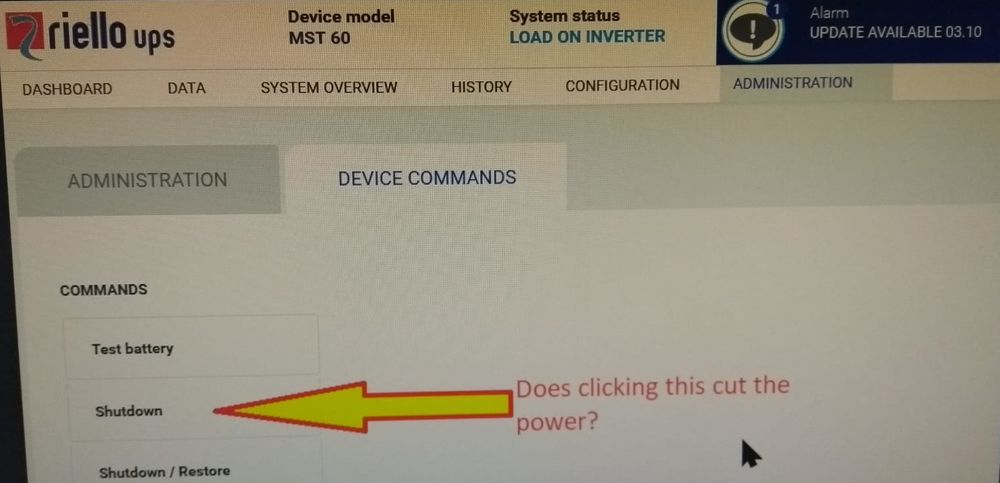
Screenshot of the UPS web interface.
As the photo above shows there's a button for shutdown and the manual confirms that:
Clicking shutdown disconnects the load from the UPS.
In other words, it was possible to power off the entire data centre after logging in to the management interface with a guessable password.
- Solution: change the password.
- Better solution: change the password and heavily restrict which parts of the network can reach the management interface.
IoT is guilty too
You'd think with IoT devices being (relatively) new, and the default password problem being well-known, that this would be a solved problem on IoT equipment. Sadly not so. It's important to review passwords used on your IoT devices too.
What should you do?
- Whenever you receive a device or an account, change the password unless you're unable to.
- If you're an organisation it's worth writing into your policies that you won't leave default credentials in place.
- Don't be complacent - Run audits to check for default credentials and then take corrective action when necessary.
Want help reviewing your devices?
Reach out today and we can review your network for default credentials.
This blog post was originally published on Jonathan's personal blog on 7th February 2021.